CYBERSECURITY | ZERO-DAY THREAT ANALYSIS | TECHOWL SHIELD
By TechOwl Shield Threat Intelligence Team | Published: November 25, 2026 | 7 Min Read
Introduction
Microsoft has patched CVE-2026-124194, an actively exploited Outlook spoofing vulnerability that can expose a user’s NTLMv2 authentication material when a specially crafted message file is opened. Microsoft marked the flaw “Exploitation Detected,” making it an immediate patching priority despite its CVSS 3.1 base score of 6.5 (Moderate).
The key distinction for defenders is that CVE-2026-124194 discloses a Net-NTLMv2 challenge–response exchange—not a plaintext password or an immediate internal breach. Below, we break down the confirmed attack mechanics, affected Office builds, practical hunting queries, and remediation steps.
Key Takeaways at a Glance
-
What Happened: CVE-2026-124194 (CWE-356) is an Outlook spoofing vulnerability that triggers an unwarned outbound network connection and exposes NTLMv2 authentication material when a crafted message file is opened.
-
Exploitation & Advisories: Confirmed as actively exploited (“Exploitation Detected” by Microsoft); added to CISA’s Known Exploited Vulnerabilities (KEV) Catalog on November 10, 2026 (KEV remediation due date: November 24, 2026, now passed) and covered in CERT-In Advisory CIAD-2026-0059 (November 12, 2026).
-
Affected Products & Fixed Builds: Microsoft 365 Apps for Enterprise (verify against Microsoft’s November 10, 2026 channel release—no single static build applies across all update channels), Office LTSC 2021 (fixed in 16.0.14334.21048), and Office LTSC 2024 (fixed in 16.0.17932.21140). The Outlook Preview Pane is not an attack vector.
-
Required Fix: Deploy the November 2026 Office security update and verify the installed Office build—Windows cumulative updates alone do not patch Outlook.
-
What Remains Unknown: Public reporting has not identified the threat actor, targeted sectors, campaign scale, or CVE-specific indicators of compromise (IOCs).
Vulnerability Snapshot
| Attribute | Details |
|---|---|
| CVE Identifier | CVE-2026-124194 |
| Vulnerability Class | CWE-356 — Product UI does not warn the user of unsafe actions (Spoofing) |
| Severity Score | CVSS 3.1 Base Score: 6.5 (Moderate) |
| Exploitation Status | Exploitation Detected in the wild; not publicly disclosed prior to advisory release |
| CISA KEV Status & Due Date | Added November 10, 2026; federal remediation due date: November 24, 2026 (passed) |
| CERT-In Advisory | CIAD-2026-0059 — Multiple Vulnerabilities in Microsoft Products (issued November 12, 2026) |
| User Interaction | Required — the recipient must actively open the crafted message file |
| Preview Pane Risk | Not affected — Microsoft confirms the Preview Pane is not an attack vector |
| Attacker Prerequisites | Unauthenticated — no prior account or system access required |
What Happened? Confirmed Attack Behaviour and Timeline
Microsoft’s advisory states that opening a crafted message file causes Outlook to initiate a connection to an attacker-controlled network location without displaying standard external-content warnings.
-
Delivery: A specially crafted message file reaches the target user (Microsoft has not disclosed the exact delivery vector used in observed attacks).
-
File Execution: The recipient opens the crafted file in an unpatched Outlook client; viewing the message in the Preview Pane does not trigger the flaw.
-
Outbound Connection: Outlook connects to an external network location controlled by the attacker without warning the user.
-
Credential Disclosure: During the authentication handshake, Windows sends the user’s NTLMv2 challenge–response material to the remote server.
Disclosure and Remediation Timeline
| Date | Milestone |
|---|---|
| November 10, 2026 | Microsoft released the November 2026 security updates patching CVE-2026-124194 and flagged active exploitation. |
| November 10, 2026 | CISA added CVE-2026-124194 to the Known Exploited Vulnerabilities (KEV) Catalog with a November 24, 2026 remediation due date. |
| November 12, 2026 | CERT-In published Advisory CIAD-2026-0059 covering November 2026 Microsoft vulnerabilities. |
| November 24, 2026 | CISA KEV binding remediation due date for US federal agencies passed. |
| November 25, 2026 | Publication date of this analysis; organisations should treat the KEV listing as an urgent patching trigger. |
Microsoft has not published threat actor attribution, victim geographies, delivery lures, or CVE-specific domains, IP addresses, or filenames. Defenders should rely on behavioral hunting rather than unverified IOC lists.
What Does NTLMv2 Exposure Mean?
NTLM is a legacy Windows challenge–response authentication protocol. When Outlook connects to a remote SMB or WebDAV resource, Windows calculates a Net-NTLMv2 response using password-derived secret material and a server-supplied challenge.
The plaintext password is never transmitted over the wire, nor is the stored NT hash directly exposed. However, capturing a Net-NTLMv2 exchange creates two distinct follow-on risks:
-
Offline Password Cracking: Attackers can run high-speed dictionary or brute-force attacks against the captured challenge–response hash to recover weak or reused passwords.
-
NTLM Relay Attacks: Attackers can forward the live authentication exchange in real time to another internal service that does not enforce signing or channel binding, impersonating the victim without cracking the password.
Enforcing SMB signing, LDAP signing, channel binding, and Extended Protection for Authentication (EPA) blocks common relay paths. Multi-factor authentication (MFA) protects interactive sign-ins but does not automatically stop NTLM relay on legacy internal protocols.
Affected Systems vs. Fixed Versions
Because Office updates ship independently of Windows OS cumulative updates, IT administrators must verify Office application builds directly rather than relying solely on Windows Update compliance dashboards.
| Product / Component | Exposure Status | Fixed Version / Remediation Action |
|---|---|---|
| Microsoft 365 Apps for Enterprise | Affected | Channel-dependent build numbers (Current, Monthly Enterprise, and Semi-Annual Enterprise channels each carry distinct version strings—no single static build applies). Update to the November 10, 2026 release or later and verify against Microsoft’s Office security release notes via Outlook (File > Office Account > About Outlook). |
| Office LTSC 2021 | Affected | Upgrade to fixed build 16.0.14334.21048 or later. |
| Office LTSC 2024 | Affected | Upgrade to fixed build 16.0.17932.21140 or later. |
| Outlook Preview Pane | Not Affected | Out of scope as an attack vector; exploitation requires actively opening the crafted message file. |
| Windows Cumulative Updates | Does Not Patch Office | Installing November 2026 Windows OS patches alone leaves Outlook vulnerable; deploy Office updates separately. |
Lab Walkthrough: Understanding NTLMSSP, SMB, and Event ID 4624
To illustrate the network and host telemetry generated during remote SMB authentication, TechOwl Shield examined a controlled two-VM lab (Kali Linux and Windows 10). Note: This is a generic Samba/SMB protocol demonstration—it does not reproduce CVE-2026-124194, does not use a crafted Outlook file, and does not demonstrate real-world credential theft.
Visualising these protocol stages helps SOC analysts recognise what outbound NTLM negotiation and destination logon artefacts look like when triaging suspected SMB or WebDAV callbacks.
1. NTLMSSP Three-Way Handshake in Wireshark
When a Windows client initiates SMB authentication to a remote host, packet captures show the three-step NTLMSSP exchange (NEGOTIATE, CHALLENGE, and AUTH) carrying the workstation and username metadata.
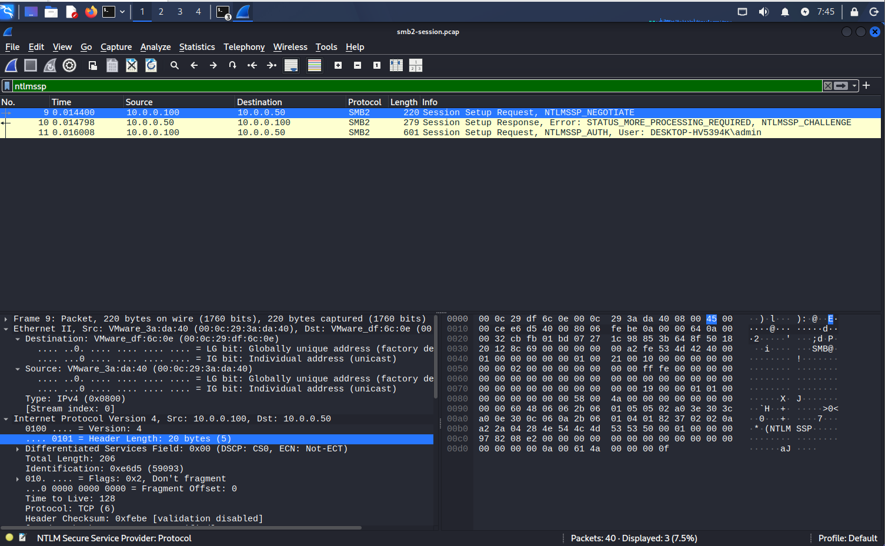
Lab Reference — Figure 1: NTLMSSP Handshake Capture
Wireshark display filter (ntlmssp) confirming Session Setup Request (NTLMSSP_NEGOTIATE), NTLMSSP_CHALLENGE, and NTLMSSP_AUTH packets between client 10.0.0.100 and SMB host 10.0.0.50.
2. SMB2 Session Setup and Tree Connect
Following NTLMSSP authentication, the client establishes an SMB2 session and issues Tree Connect requests to remote shares (such as IPC$ or a target share path).
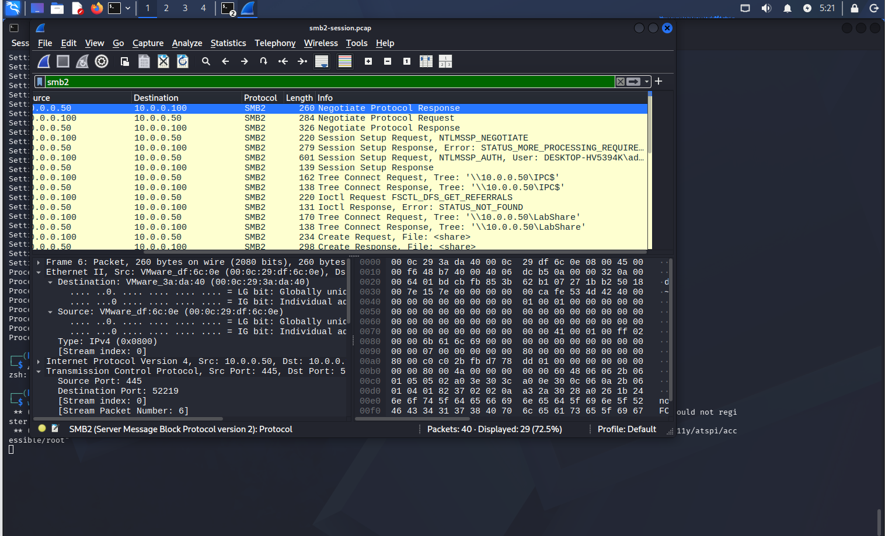
Lab Reference — Figure 2: SMB2 Session & Share Access
Wireshark display filter (smb2) showing SMB2 protocol negotiation and Tree Connect Request to \\10.0.0.50\LabShare following NTLMSSP authentication.
3. Windows Security Event ID 4624 Logon Telemetry
On a Windows destination host, a successful network authentication generates Event ID 4624 (typically Logon Type 3 for network share access). In a hunt, Event ID 4624 alone does not prove Outlook initiated the request—analysts must correlate it with client-side process creation and outbound firewall/proxy logs.
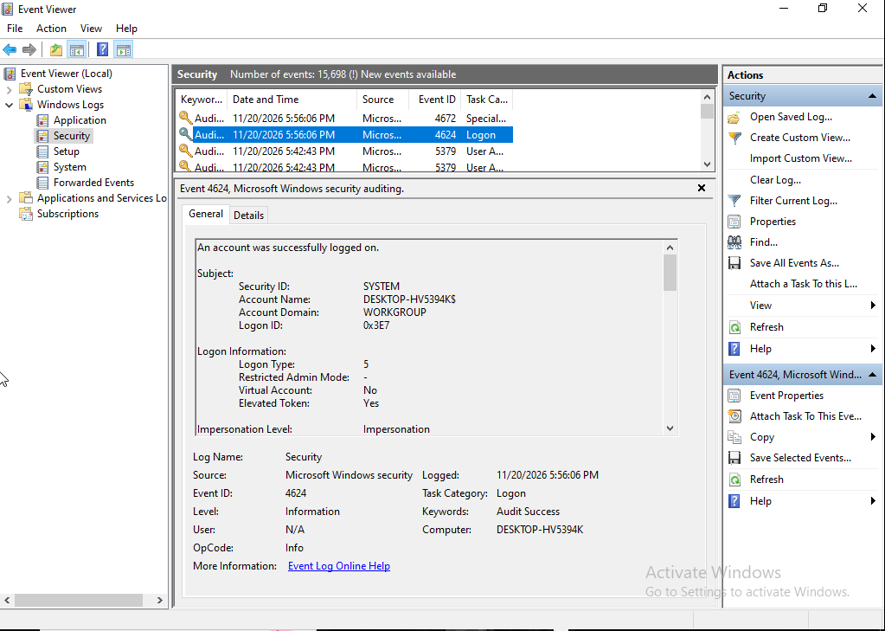
Lab Reference — Figure 3: Windows Security Event ID 4624
Windows Event Viewer Security log showing Event ID 4624 audit details, logon type, and account context on the destination machine.
Actionable Remediation and Detection
1. Inventory and Verify Office Builds
Audit all Windows endpoints, VDI pools, and shared workstations running Microsoft 365 Apps or Office LTSC, then verify build numbers directly via PowerShell (confirming 16.0.14334.21048+ for Office LTSC 2021, 16.0.17932.21140+ for Office LTSC 2024, or the corresponding November 10, 2026 channel build for Microsoft 365 Apps):
# Check installed Outlook executable version and update channel build across endpoints
$outlookPath = (Get-Command outlook.exe -ErrorAction SilentlyContinue).Source
if ($outlookPath) {
(Get-Item $outlookPath).VersionInfo | Select-Object ProductName, ProductVersion, FileVersion
}
Ensure users close and relaunch Outlook after patch deployment so updated binaries load into memory.
2. Block Egress SMB and Harden Authentication
-
Block Outbound SMB (TCP 445): Deny outbound TCP ports 445 and 139 from all user workstations to the internet at perimeter firewalls and secure web gateways.
-
Require Protocol Signing & EPA: Enforce SMB signing across clients and servers, enable LDAP signing and channel binding on Active Directory domain controllers, and configure Extended Protection for Authentication (EPA) on Exchange/IIS endpoints after compatibility testing.
-
Audit and Reduce NTLM Usage: Enable NTLM auditing (Network security: Restrict NTLM: Audit NTLM authentication in this domain) and add eligible privileged accounts to the Protected Users security group to block NTLM credential caching.
3. Hunt Across Endpoint, Identity, and Mail Telemetry
Prioritise alerts where outbound network activity aligns with .msg file access across at least two independent log sources:
-
Endpoint / EDR Hunting (KQL for Microsoft Defender for Endpoint): Look for OUTLOOK.EXE initiating outbound connections over SMB (445) or WebDAV/HTTP (80, 443) to external IP addresses:
DeviceNetworkEvents
| where Timestamp > ago(14d)
| where InitiatingProcessFileName =~ "outlook.exe"
| where RemotePort in (445, 139, 80, 443)
| where not(ipv4_is_private(RemoteIP))
| project Timestamp, DeviceName, AccountName, RemoteIP, RemotePort, RemoteUrl
| order by Timestamp desc-
Windows & AD Identity Logs: Correlate destination Event ID 4624 (Logon Type 3) with domain controller Event ID 4776 (NTLM credential validation) and Event ID 8004 (NTLM Operational / Defender for Identity).
-
Email Gateway & Mailbox Audits: Search mail transport logs for external inbound emails carrying .msg attachments or unusual shortcut/file lures, and cross-reference MailItemsAccessed audit records to identify users who opened them.
4. Incident Response Checklist for Suspected Exposure
-
Scope & Contain: Identify endpoints that opened suspicious .msg files or initiated outbound TCP 445 traffic, isolate affected hosts, and block verified malicious destinations at the firewall.
-
Preserve Evidence: Capture the original email/message file, EDR process trees, proxy/firewall egress logs, and Windows Security event logs before remediation.
-
Reset Credentials & Check Lateral Movement: Force password resets for any user whose Net-NTLMv2 exchange may have leaked externally (prioritising privileged accounts), and audit AD/file-share access logs for anomalous Logon Type 3 sessions.
India-Focused Regulatory Considerations
Indian enterprises and regulated entities should map remediation and incident response to CERT-In Advisory CIAD-2026-0059 (issued November 12, 2026), CERT-In’s 6-hour incident reporting directions, RBI cybersecurity frameworks (for banks and NBFCs), and breach notification obligations under the Digital Personal Data Protection (DPDP) Act, 2023, in coordination with legal and compliance teams.
How TechOwl Shield Helps
-
External Attack Surface & Credential Risk Monitoring: TechOwl Shield continuously tracks internet-facing assets, exposed services, and credential-leak signals to shrink your external risk footprint before attackers pivot.
-
24/7 Managed SOC & Telemetry Correlation: TechOwl’s Managed SOC correlates anomalous outbound SMB/WebDAV connections, Outlook network activity, and Active Directory NTLM events to detect exploitation attempts early.
-
VAPT & Adversary Simulation: Through Vulnerability Assessment, Penetration Testing, and Breach & Attack Simulation (BAS), TechOwl validates your SMB/LDAP signing posture, egress filtering, and patch verification controls against real-world NTLM relay paths.
Frequently Asked Questions (FAQs)
1. Is CVE-2026-124194 being actively exploited in the wild?
Yes. Microsoft flagged CVE-2026-124194 as “Exploitation Detected” on November 10, 2026, CISA added it to the KEV Catalog the same day (with a November 24, 2026 remediation due date), and CERT-In issued Advisory CIAD-2026-0059 on November 12, 2026.
2. Does viewing an email in the Outlook Preview Pane trigger CVE-2026-124194?
No. Microsoft explicitly states that the Preview Pane is not an attack vector; the recipient must actively open the specially crafted message file.
3. Which Office builds fix CVE-2026-124194, and does a Windows update patch it?
Windows cumulative updates do not patch Office. Install the November 2026 Office security update: build 16.0.14334.21048 or later for Office LTSC 2021, build 16.0.17932.21140 or later for Office LTSC 2024, or your channel’s November 10, 2026 release for Microsoft 365 Apps for Enterprise (which uses channel-specific build numbers rather than a single static build).
4. If an attacker captures an NTLMv2 hash, do they automatically have the user’s password?
No. The captured Net-NTLMv2 exchange is a challenge–response hash, not a plaintext password. However, attackers can attempt offline password cracking against weak passwords or relay the authentication to unprotected internal services.
5. Why did CISA assign a November 24, 2026 KEV due date for a CVSS 6.5 vulnerability?
While the CVSS 3.1 score is 6.5 (Moderate), confirmed active exploitation in the wild elevates operational urgency—especially in environments where NTLM relay or weak passwords remain unmitigated.
6. Have threat actors or specific IOCs been publicly identified for CVE-2026-124194?
No. As of November 25, 2026, Microsoft, CISA, and CERT-In have not publicly attributed the attacks or released CVE-specific malicious domains, IP addresses, or file hashes.
Sources and Further Reading
-
Microsoft Security Response Center (MSRC): CVE-2026-124194 — Microsoft Outlook Spoofing Vulnerability (https://msrc.microsoft.com/security-guidance/advisory/CVE-2026-124194)
-
CISA Known Exploited Vulnerabilities (KEV) Catalog (https://www.cisa.gov/known-exploited-vulnerabilities-catalog)
-
CERT-In Advisory CIAD-2026-0059: Multiple Vulnerabilities in Microsoft Products, November 12, 2026 (https://www.cert-in.org.in/s2cMainServlet?VLCODE=CIAD-2026-0059&pageid=PUBVLNOTES02)
-
NVD: CVE-2026-124194 Detail (https://nvd.nist.gov/vuln/detail/cve-2026-124194)
-
Microsoft Learn: SMB Signing Overview (https://learn.microsoft.com/windows-server/storage/file-server/smb-signing-overview)
-
Microsoft Learn: LDAP Channel Binding in Active Directory (https://learn.microsoft.com/en-us/windows-server/identity/ad-ds/ldap-channel-binding)
-
Microsoft Learn: Protected Users Security Group (https://learn.microsoft.com/windows-server/security/credentials-protection-and-management/protected-users-security-group)
Related TechOwl Resources
-
TechOwl Shield Platform: https://www.techowl.com/techowlshield.html
-
Managed SOC Services: https://www.techowl.com/soc-service.html
-
Incident Response Services: https://www.techowl.com/incident-response.html
-
Breach & Attack Simulation (BAS): https://www.techowl.com/breach-attack-simulation.html
-
Threat Intelligence: https://www.techowl.com/threat-intelligence.html
-
Dark Web Monitoring: https://www.techowl.com/dark-web-monitoring.html