CYBERSECURITY | ZERO-DAY THREAT ANALYSIS
By TechOwl Shield Threat Intelligence Team | Published: November 25, 2026 | Lab testing: November 18, 2026
Google has confirmed that attackers are exploiting CVE-2026-125350, a high-severity use-after-free vulnerability in Chrome’s XML processing. A crafted webpage can trigger the flaw when a user visits it, potentially allowing code execution inside the browser sandbox.
Google released patched Chrome builds on November 9, 2026. The issue matters beyond Chrome: other browsers and desktop applications may embed Chromium components, but their exposure and patch status must be checked against each vendor’s own release information.
TechOwl’s isolated laboratory testing reproduced a renderer crash on Chrome 157.0.8103.38 and captured Crashpad telemetry. That test demonstrates a crash condition; it does not independently demonstrate code execution or reproduce the in-the-wild attack chain.
Key Takeaways
-
What: CVE-2026-125350 is a CWE-416 use-after-free vulnerability in Google Chrome’s XML processing component.
-
Status: Google says an exploit exists in the wild. CISA added the CVE to its Known Exploited Vulnerabilities (KEV) Catalog on November 10, 2026.
-
Affected: Chrome versions before the relevant fixed builds are affected. Other Chromium-based products require vendor-specific verification.
-
Fix: Update Chrome to 157.0.8103.50/.51 on Windows and macOS, or 157.0.8103.50 on Linux, then fully restart the browser.
-
Unknown: Google has not publicly attributed the activity to a named threat actor or disclosed a complete exploitation chain.
What Happened: Incident Timeline
Google’s advisory confirms exploitation in the wild and identifies the vulnerability as a high-severity use-after-free issue in XML. The timeline below separates vendor-published events from TechOwl’s own laboratory work.
| Date | Event |
|---|---|
| November 9, 2026 | Google published a Chrome Stable Channel update: 157.0.8103.50/.51 for Windows and macOS, and 157.0.8103.50 for Linux. |
| November 10, 2026 | The CVE record was published. CISA added CVE-2026-125350 to its KEV Catalog. |
| November 18, 2026 | TechOwl reports reproducing a renderer crash in an isolated lab using Chrome 157.0.8103.38. |
| November 24, 2026 | The CISA KEV remediation due date recorded for this entry. |
| November 25, 2026 | This article’s publication date. Administrators should confirm that fixed builds are deployed and running. |
The CVE record describes a use-after-free in Chrome’s XML component and states that a crafted HTML page could allow a remote attacker to execute code inside the sandbox. Google’s release note separately confirms that an exploit for this CVE exists in the wild.
Root Cause in Plain English
Chrome processes XML and can apply XSLT (Extensible Stylesheet Language Transformations) to transform XML documents. A use-after-free occurs when software continues to access memory after that memory has been released. Depending on how the stale reference is used and what occupies the freed memory, the result can range from a crash to more serious memory corruption.
TechOwl’s working analysis of the lab behavior focuses on recursive or re-entrant XSLT processing and pattern-cache handling. The supplied laboratory notes identify xsltTestCompMatchDirect and pattern.c as relevant investigation points. These implementation details should be treated as TechOwl’s analysis, not as a complete root-cause statement published by Google; the public vendor advisory does not disclose the full technical chain.
| Stage | What it means | Security relevance |
|---|---|---|
| 1. XML/XSLT processing | Chrome processes XML content and evaluates stylesheet instructions. | A crafted document can exercise complex parser and transformation paths. |
| 2. Re-entrant evaluation | Nested stylesheet or document processing may cause evaluation to re-enter related code paths. | The lab analysis associates this behavior with the observed cache-handling problem. |
| 3. Stale reference | A pointer or reference may be used after the memory it refers to has been released. | This is the defining use-after-free condition. |
| 4. Memory corruption | The invalid access can crash the renderer; exploitation may require additional techniques. | A crash-only PoC is not proof of reliable code execution. |
TechOwl Lab Proof: Reproducing the Renderer Crash
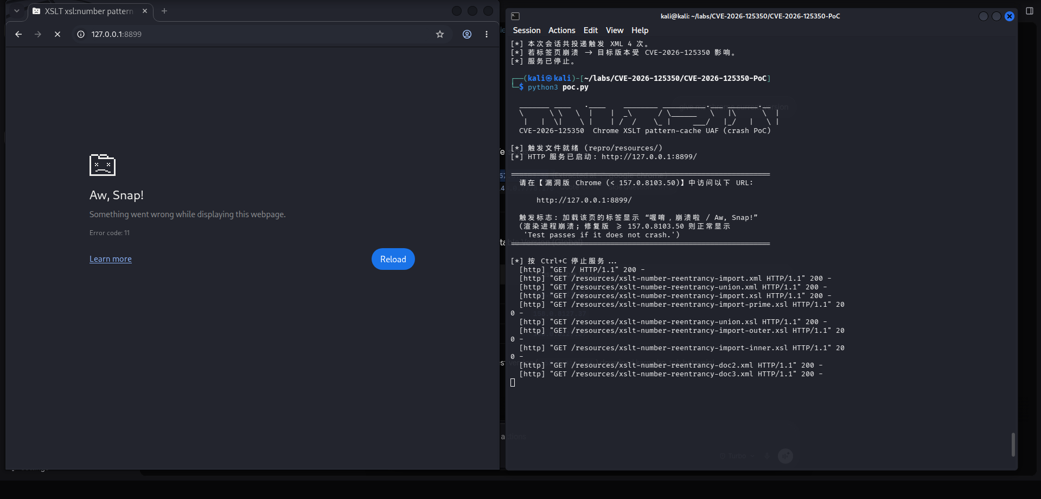
TechOwl tested the behavior in an isolated Kali Linux environment. The purpose was to observe the renderer’s failure and collect forensic telemetry, not to demonstrate a weaponized exploit.
Lab setup
-
Target: Kali Linux Rolling with Chrome 157.0.8103.38 and the Crashpad handler active.
-
Harness: A local Python HTTP server bound to 127.0.0.1:8899.
-
Test content: Recursive XSLT files following the xslt-number-reentrancy-*.xsl naming pattern, with supporting XML documents.
-
Isolation: The test server was bound to loopback and used for controlled local validation.
Observed behavior
-
The local server logged four recursive XML/XSL delivery passes during the test session.
-
Chrome processed the content and the tab terminated with “Aw, Snap! Error code: 11” (SIGSEGV).
-
The crash was investigated through the Chrome Crashpad output and a minidump analysis using Breakpad’s minidump_stackwalk.
Crashpad and Breakpad findings
The lab notes record a minidump in the Chrome profile’s Crash Reports/completed directory. The reported stack-walk findings were SIGSEGV, a crash address of 0x0, and the CrRendererMain thread. The team interpreted this as an invalid memory dereference during pattern-cache lookup.
# Typical Chrome Crashpad location on Linux
~/.config/google-chrome/Crash Reports/completed/
# Example offline analysis command
minidump_stackwalk <path-to-minidump> > stackwalk_output.txt
A NULL-address crash is consistent with an invalid pointer access, but it does not by itself prove the exact allocator behavior or the steps used in a real attack. The article’s lab result is a denial-of-service-style crash reproduction. Public crash PoCs should not be described as providing code execution unless that behavior has been independently demonstrated.
Proof of Concept vs. Real-World Exploitation
Google confirms that exploitation exists in the wild. TechOwl’s lab test, however, reproduced a renderer crash rather than arbitrary code execution. Turning a memory-corruption flaw into reliable code execution can require additional exploit-development steps. Escaping the browser sandbox would generally require a separate weakness or another route out of the sandbox.
The specific heap-manipulation techniques, any chained vulnerability, and the real-world attack sequence have not been established by the supplied lab evidence or disclosed in Google’s public release note. Treat these as open questions, not confirmed facts about the campaign.
Affected Systems and Risk
| Product / platform | Fixed Chrome build stated by Google | Administrator action |
|---|---|---|
| Google Chrome — Linux | 157.0.8103.50 | Update to this build or a later vendor-supported fixed build. |
| Google Chrome — Windows | 157.0.8103.50/.51 | Update to the applicable Stable build or later. |
| Google Chrome — macOS | 157.0.8103.50/.51 | Update to the applicable Stable build or later. |
| Microsoft Edge, Brave, Opera | Vendor-specific | Check each browser vendor’s advisory and installed version. |
| Electron, CEF and WebView applications | Runtime/application-specific | Identify the embedded Chromium version and check the application vendor’s update. |
Do not assume that every Chromium-based product is affected or fixed on the same schedule as Chrome. Vendors may backport fixes, use different release branches, or ship updates on independent schedules. Prioritize applications that render untrusted web content, but confirm status using the vendor’s advisory.
How to Check Your Chrome Version
For a quick manual check, open chrome://version in Chrome. For fleet checks, inspect the installed version and ensure that the running browser has restarted after the update.
Linux
google-chrome --version
chromium --version
dpkg -l | grep -E 'google-chrome|chromium'
pgrep -af 'chrome|chromium'
Windows PowerShell
(Get-Item (Get-Command chrome.exe).Source).VersionInfo.ProductVersionmacOS
/Applications/Google\ Chrome.app/Contents/MacOS/Google\ Chrome --versionElectron applications
Where the application exposes its runtime in its developer tools, inspect process.versions.chrome. Availability and access to this value depend on the application. Confirm the result against the application vendor’s security advisory.
How to Fix It and Reduce Risk
1. Update Chrome
Deploy the fixed Chrome Stable build for the relevant operating system: 157.0.8103.50/.51 for Windows and macOS, and 157.0.8103.50 for Linux. Prefer the latest vendor-supported Stable build rather than pinning systems to the minimum fixed version.
2. Fully restart the browser
An update may replace files on disk while existing browser processes continue running. Ask users to save their work, close Chrome completely, and relaunch it. Verify the running version after restart. Avoid force-killing browsers as the first step because unsaved user work may be lost.
3. Enforce enterprise relaunch policy
Windows administrators can use Chrome Enterprise policies to notify users about required relaunches and set an enforcement window. Validate the supported policy names, registry/GPO location, and behavior against the current Google Chrome Enterprise policy documentation before deployment. The source draft identifies RelaunchNotification and RelaunchNotificationPeriod; policy values and enforcement semantics should be checked against the current vendor documentation.
4. Maintain browser hardening
-
Keep Chrome’s sandbox enabled. Do not launch browsers with --no-sandbox except in tightly controlled testing where the security implications are understood.
-
Maintain Site Isolation and other supported enterprise security policies.
-
Restrict or inspect untrusted web content at secure web gateways where appropriate; do not rely on filtering XSLT alone as a substitute for patching.
-
Inventory Chromium-based desktop applications and include their embedded browser runtimes in patch management.
Detection and Threat Hunting
A renderer crash is not proof of exploitation. Nevertheless, unusual clusters of Chrome renderer crashes—especially after visits to suspicious external sites—deserve investigation. Correlate browser crash telemetry with process creation, endpoint alerts, proxy records and user reports.
| Artifact | Where to look | Interpretation |
|---|---|---|
| xslt-number-reentrancy-*.xsl | Proxy logs, URI logs, downloaded files | Pattern associated with the public PoC naming convention; it can be copied or changed and is not a definitive IOC. |
| Chrome Crashpad reports | Linux Chrome profile Crash Reports/completed directory | Renderer crash evidence; inspect the dump and surrounding telemetry. |
| Crashpad reports | Windows Chrome user profile under Google\Chrome\User Data\Crashpad\reports | Crash artifacts for investigation. |
| Windows Event ID 1000 | Windows Application log | Check whether chrome.exe or chrome.dll faulted and review exception details. |
| Chrome renderer segfault | Linux dmesg / auditd / endpoint telemetry | Corroborating evidence of a process crash; not proof of malicious exploitation. |
The minidump filename shown in TechOwl’s lab notes is a test artifact, not a campaign indicator. Do not search enterprise fleets for that specific filename as an IOC.
Sigma Hunting Rule: Chrome Spawning a Shell
The following experimental rule looks for Chrome spawning a command shell or script interpreter. It is a hunting signal, not a standalone CVE detector. Correlate hits with recent renderer crashes and investigate legitimate native-messaging hosts, browser extensions and administrative tooling.
title: Chrome Spawning Shell or Script Interpreter
id: 7e2f1a89-4d6b-4c22-9a81-e5d871b02f1a
status: experimental
description: Chrome starting a command shell or script host; investigate for possible abuse
author: TechOwl Shield Threat Intelligence Team
date: 2026/11/25
logsource:
category: process_creation
product: windows
detection:
selection:
ParentImage|endswith: '\chrome.exe'
Image|endswith:
- '\cmd.exe'
- '\powershell.exe'
- '\pwsh.exe'
- '\wscript.exe'
- '\cscript.exe'
condition: selection
falsepositives:
- Browser extensions with native messaging hosts
- Administrative helper scripts
level: high
YARA Hunting Rule: Recursive XSLT Pattern
This heuristic rule searches for a combination of XML/XSLT strings associated with the lab PoC pattern. Legitimate stylesheets may contain some of these strings, and encrypted or compressed traffic may not be visible to the inspection point. Tune it in a controlled environment before operational use.
rule Exploit_Chromium_XSLT_Reentrancy_CVE_2026_125350 {
meta:
description = "Heuristic for recursive XSLT patterns associated with CVE-2026-125350 research"
author = "TechOwl Shield Threat Intelligence Team"
date = "2026-11-25"
reference = "CVE-2026-125350"
strings:
$xsl1 = "<xsl:stylesheet" ascii nocase
$xsl2 = "<xsl:number" ascii nocase
$re1 = "xsl:import" ascii nocase
$re2 = "document(" ascii nocase
$pat1 = "xslt-number-reentrancy" ascii nocase
condition:
$xsl1 and $xsl2 and (($re1 and $re2) or $pat1)
}
What We Still Don’t Know
-
Attribution: Google’s public release note does not name the actor or group behind the in-the-wild exploitation.
-
Full exploit chain: The public information cited here does not establish the exact steps used by attackers after triggering the vulnerability.
-
Sandbox escape: No specific second vulnerability is identified in the public advisory cited for this article.
-
Third-party patch status: Electron, CEF and browser vendors maintain their own release schedules. Check each vendor rather than assuming Chrome’s fix has reached every embedded runtime.
Compliance Considerations for Indian Enterprises
CERT-In’s 2022 directions include a six-hour reporting requirement for specified cyber security incidents after noticing them. A browser vulnerability by itself does not automatically mean that a reportable incident has occurred; organizations should assess the facts and applicable reporting requirements. If a personal data breach occurs, assess obligations under the Digital Personal Data Protection Act, 2023 and the rules and provisions in force at the relevant time. RBI-regulated entities should also follow applicable RBI cyber-security and incident-reporting requirements. Obtain legal or compliance advice for incident-specific decisions.
How TechOwl Shield Helps
A browser zero-day can affect endpoints, remote-access environments and applications that embed browser engines. TechOwl Shield can support defensive readiness through:
-
Browser and endpoint visibility: Inventory Chrome, Chromium and embedded browser versions across managed assets, and prioritize systems that remain unpatched or have not been restarted.
-
Attack-surface and exposure management: Map internet-facing applications, VDI gateways, jump hosts and other exposed assets that may increase organizational exposure.
-
Managed SOC, threat hunting and validation: Correlate renderer-crash clusters, suspicious child processes and network telemetry; validate patch coverage, endpoint controls and detection readiness through authorized testing.
Frequently Asked Questions
1. What is CVE-2026-125350?
It is a high-severity use-after-free vulnerability in Google Chrome’s XML processing component, tracked as CWE-416. The CVE record says a crafted HTML page could allow remote code execution inside the browser sandbox.
2. Is CVE-2026-125350 being exploited in the wild?
Yes. Google’s November 9, 2026 Stable Channel update says an exploit exists in the wild. CISA added the CVE to its KEV Catalog on November 10, 2026.
3. Which Chrome versions contain the fix?
Google’s November 9 release lists 157.0.8103.50/.51 for Windows and macOS and 157.0.8103.50 for Linux. Install the latest supported Stable build for your platform.
4. Do I need to restart Chrome after updating?
Yes. Fully close and relaunch Chrome, then verify the running version. A process that remains open may continue using code loaded before the update.
5. Are Edge, Brave, Opera, Slack or Teams affected?
Do not assume that all are affected or fixed at the same time. They may use Chromium components, but each vendor or application maintainer controls its build and patch schedule. Check the vendor advisory and embedded runtime version.
6. Does TechOwl’s lab test prove remote code execution?
No. The supplied lab evidence demonstrates a renderer crash and Crashpad telemetry on the tested build. It does not demonstrate a complete code-execution exploit or the real-world attacker chain.
Sources and Further Reading
-
Google Chrome Stable Channel Update for Desktop — November 9, 2026 — https://chromereleases.googleblog.com/2026/11/stable-channel-update-for-desktop_018223192.html
-
CVE.org — CVE-2026-125350 — https://www.cve.org/CVERecord?id=2026-125350
-
Canadian Centre for Cyber Security — Google Security Advisory AV26-1140 — https://www.cyber.gc.ca/en/alerts-advisories/google-security-advisory-av26-1140
-
NHS England Digital — Google Releases Security Update for Chrome — https://digital.nhs.uk/cyber-alerts/2026/cc-4887
-
CERT-In Vulnerability Note CIVN-2026-0544 — https://www.cert-in.org.in/s2cMainServlet?VLCODE=CIVN-2026-0544&pageid=PUBVLNOTES01
-
Google Breakpad project documentation — https://github.com/google/breakpad