Syslog Configuration
Log in to your TechOwl Shield tool using the following URL along with your username and
password:
https://app.techowlshield.com/login
From the left menu, navigate to Settings > User Profile and click on
'Manage Syslog'.
Configure the Syslog server IP to which the logs will be forwarded. The default port used is
514/UDP, and this cannot be changed from the interface. Ensure that the public
IP 43.242.38.106 is whitelisted and that
UDP port 514 is allowed in your firewall/security
settings.
All data will be sent to the respective SOC
tool from the public IP 43.242.38.106 using UDP port 514.
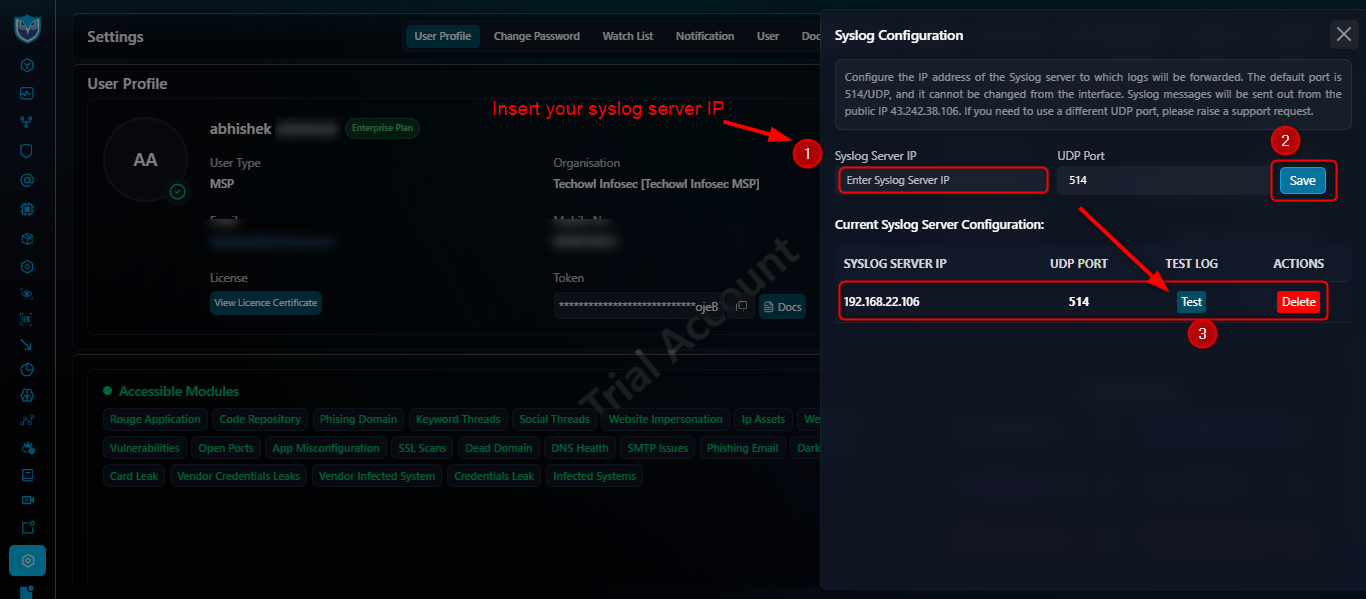
After completing the Syslog configuration, you can verify whether the logs are being forwarded
to any SOC tool (e.g., Splunk) by clicking the 'Test' button. If the log or
event appears in the SOC tool, it confirms that the Syslog configuration was successful.
Module-wise Log Generation
Module-wise logs or events are forwarded from the TechOwl Shield tool to any SOC tool (e.g.,
Splunk) based on the individual threats triggered within each module. This process is fully
automated — whenever a threat is detected, the corresponding log is automatically sent to the
SOC tool. Additionally, you can also forward logs manually for each individual module. Please
find the module-wise screenshots below.
1
Vendor Credential Leaks
<13>May 28 05:36:55 custom-sender: identifier: techowl-shield || module: vendor-credential-leaks || id: 30180 || user:
[email protected] || password: Naveen@cad0 || sourceshort: url_login_pass || current_status: Inprogress || current_severity: Critical || alert_created_at: 2024-09-04 12:49:04 || alert_updated_at: 2025-05-24 14:05:32 || alert_updated_by: abhishek abhishek ||
| Field |
Description |
| module |
Identifies exposed third-party credentials. |
| id |
Unique alert ID (30180). |
| user |
Exposed email address. |
| password |
Exposed password. |
| sourceshort |
Source of the leak (url_login_pass). |
| current_status |
Status of the alert (Inprogress). |
| current_severity |
Severity level (Critical). |
| alert_created_at |
First detection timestamp. |
| alert_updated_at |
Last update timestamp. |
| alert_updated_by |
User who updated the alert. |
From the left menu, navigate to Supply Chain Risk and select
'Credential Leak' > Click on Action button.
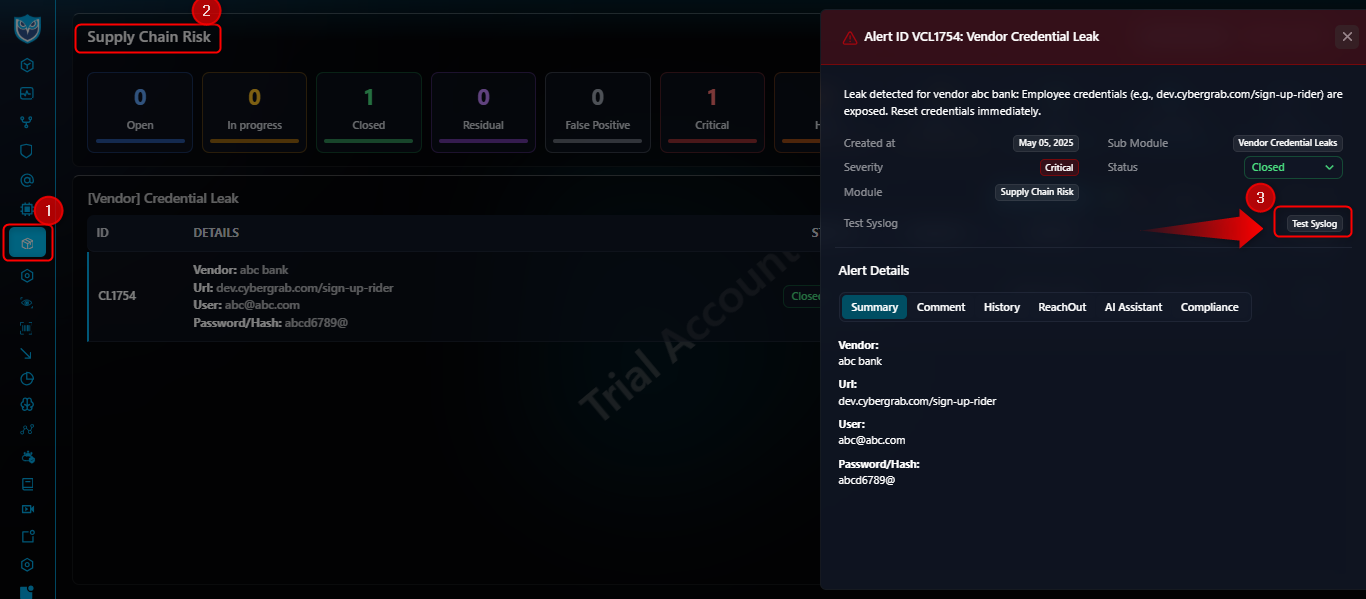
2
Card Leak
<13>May 28 05:36:46 custom-sender: identifier: techowl-shield || module: card-leak || id: 353157 || bot_id: chat_message/telegram/-1001674931084/142441709568 || content_hash: 87b898a2978f84b51d0551561a5af22c7f3a6e9e || data: {...} || current_status: Inprogress || current_severity: Critical || alert_created_at: 2024-04-08 17:44:18 || alert_updated_at: 2025-05-24 14:05:26 || alert_updated_by: abhishek abhishek ||
- bot_id: Telegram message identifier.
- content_hash: Unique hash of message content.
- data: JSON containing actor, title, and card details.
- current_status / current_severity / timestamps: For tracking state and priority.
From the left menu, navigate to Darkweb Threats and select
'Card Leak' > Click on Action button.
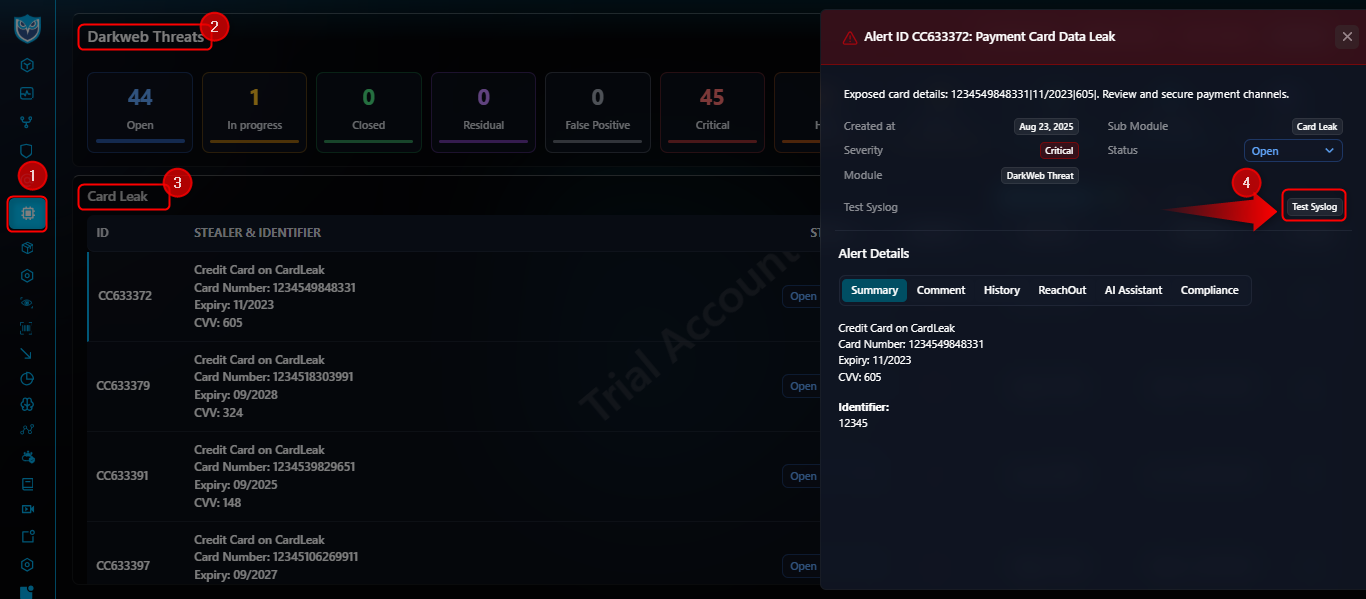
3
Dark Network
<13>May 28 05:36:25 custom-sender: identifier: techowl-shield || module: dark-network || id: 370 || assetable_type: App\Models\Keyword || assetable_id: 4958 || dark_web_feed_id: 18743 || dark__web_feed: {...} ||
- assetable_type / assetable_id: Links to monitored keyword or asset.
- dark_web_feed_id: Dark web feed identifier.
- dark__web_feed: JSON including threat actor, victim, description, screenshots, and leak URL.
From the left menu, navigate to Darkweb Threats and select
'Dark Network' > Click on Action button.
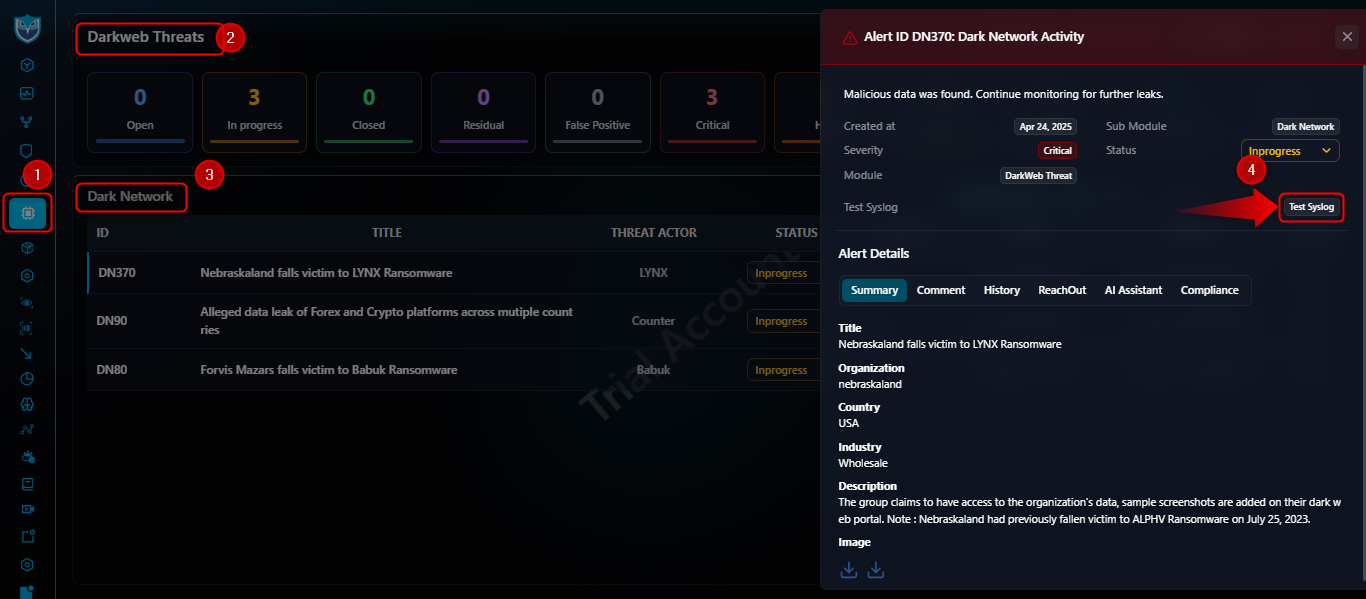
4
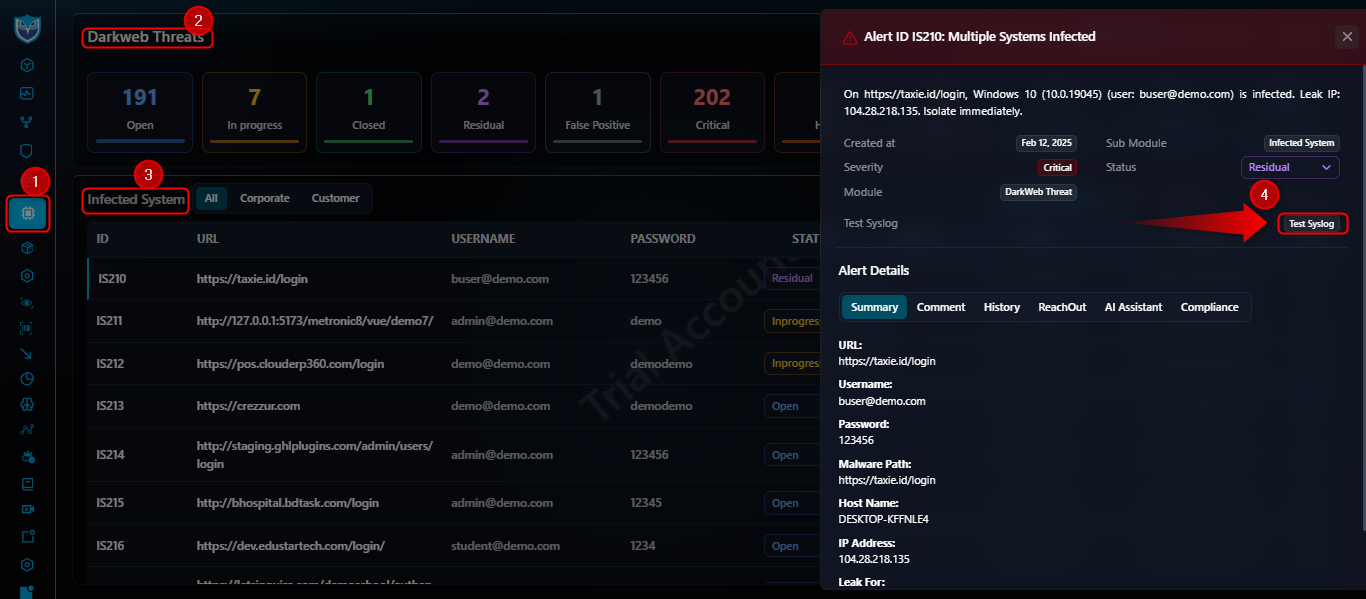
Infected Systems
<13>May 28 05:36:19 custom-sender: identifier: techowl-shield || module: infected-systems || id: 210 || compromised_host_hostname: DESKTOP-KFFNLE4 || compromised_ip_address: 104.28.218.135 || username:
[email protected] || password: 123456 || country: ID || url: https://taxie.id/login || current_status: Residual || current_severity: Critical ||
- compromised_host_hostname: Hostname of infected machine.
- compromised_ip_address: IP address of the host.
- username / password: Stolen credentials.
- country: Geolocation code.
- url: Malicious URL involved.
From the left menu, navigate to Darkweb Threats and select
'Infected Systems' > Click on Action button.
5
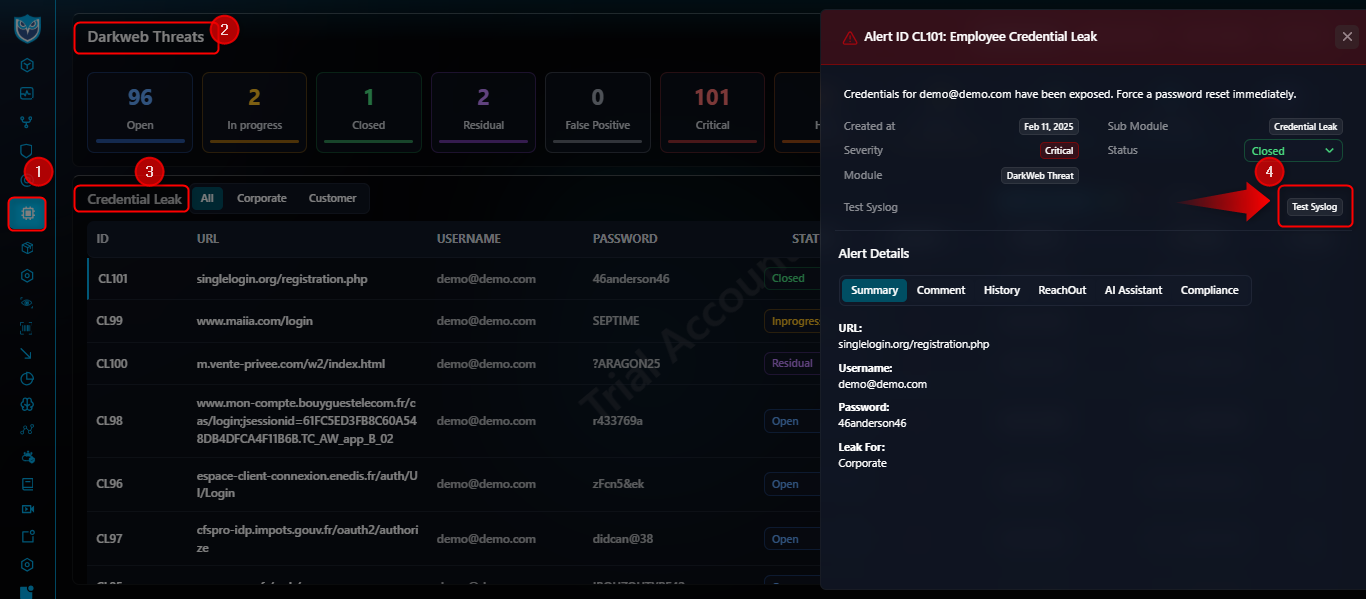
Credential Leak
<13>May 28 05:36:13 custom-sender: identifier: techowl-shield || module: credential-leak || id: 101 || url: singlelogin.org/registration.php || username:
[email protected] || password: 46anderson46 ||
- url: Page where credentials were found.
- username / password: Exposed credentials.
From the left menu, navigate to Darkweb Threats and select
'Credential Leak' > Click on Action button.
6
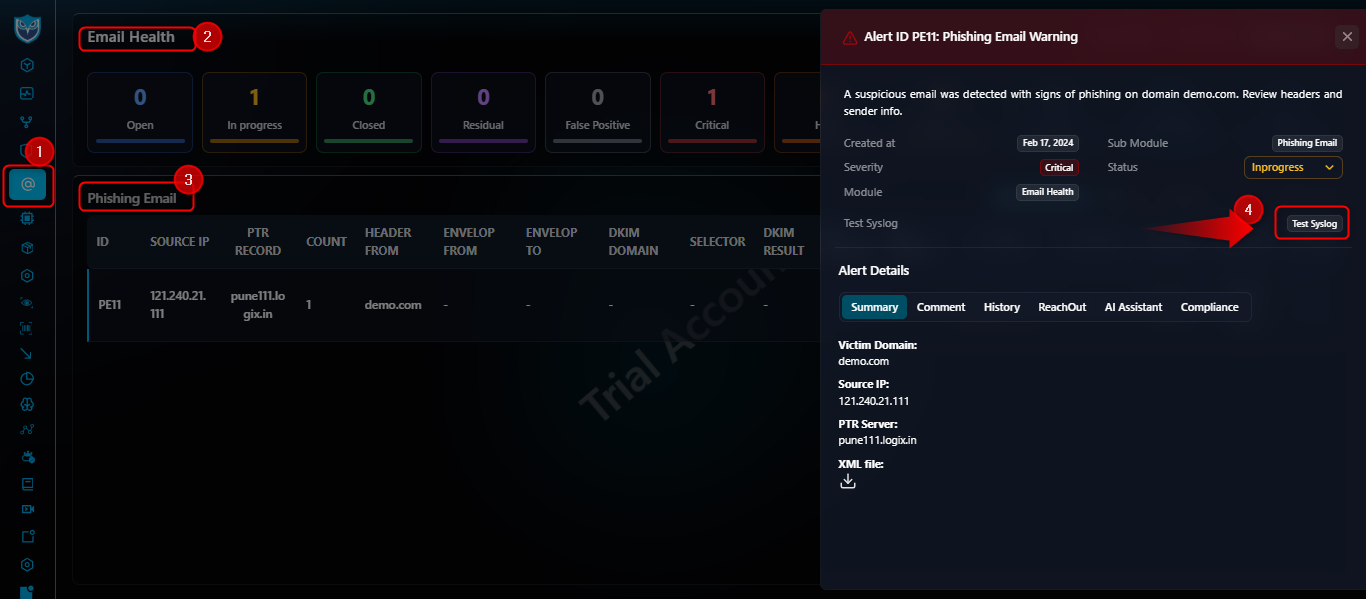
Phishing Email
<13>May 28 05:36:03 custom-sender: identifier: techowl-shield || module: phishing-email || id: 11 || source_ip: 121.240.21.111 || ptr_server: pune111.logix.in || victim_domain: demo.com ||
- source_ip: IP address of phishing sender.
- ptr_server: Reverse DNS of sender.
- victim_domain: Targeted domain.
From the left menu, navigate to Email Health and select
'Phishing Email' > Click on Action button.
7
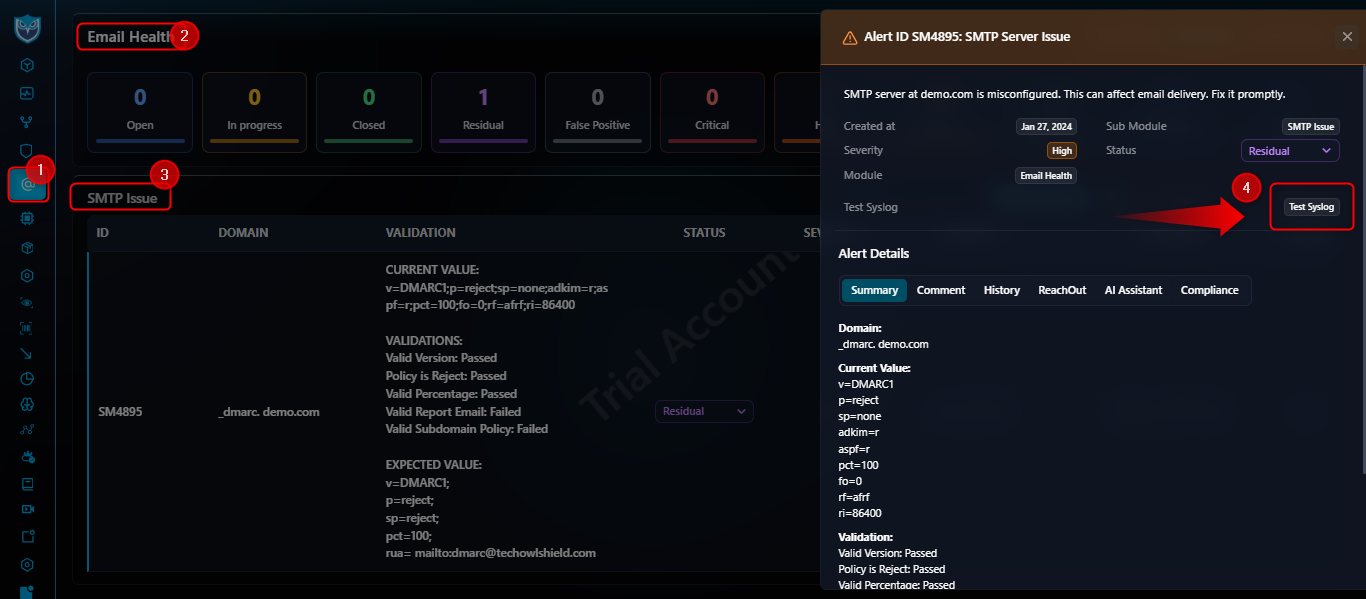
SMTP Issue
<13>May 28 05:35:59 custom-sender: identifier: techowl-shield || module: smtp-issue || id: 4895 || value: v=DMARC1;p=reject;sp=none;adkim=r;aspf=r;pct=100;fo=0;rf=afrf;ri=86400 || validation_result: {"Valid Version":"Passed","Policy is Reject":"Passed","Valid Percentage":"Passed","Valid Report Email":"Failed","Valid Subdomain Policy":"Failed"} || _domain: demo.com ||
- value: DMARC/SPF policy string.
- validation_result: JSON of checks passed/failed.
- _domain: Domain under test.
From the left menu, navigate to Email Health and select
'SMTP Issue' > Click on Action button.
8
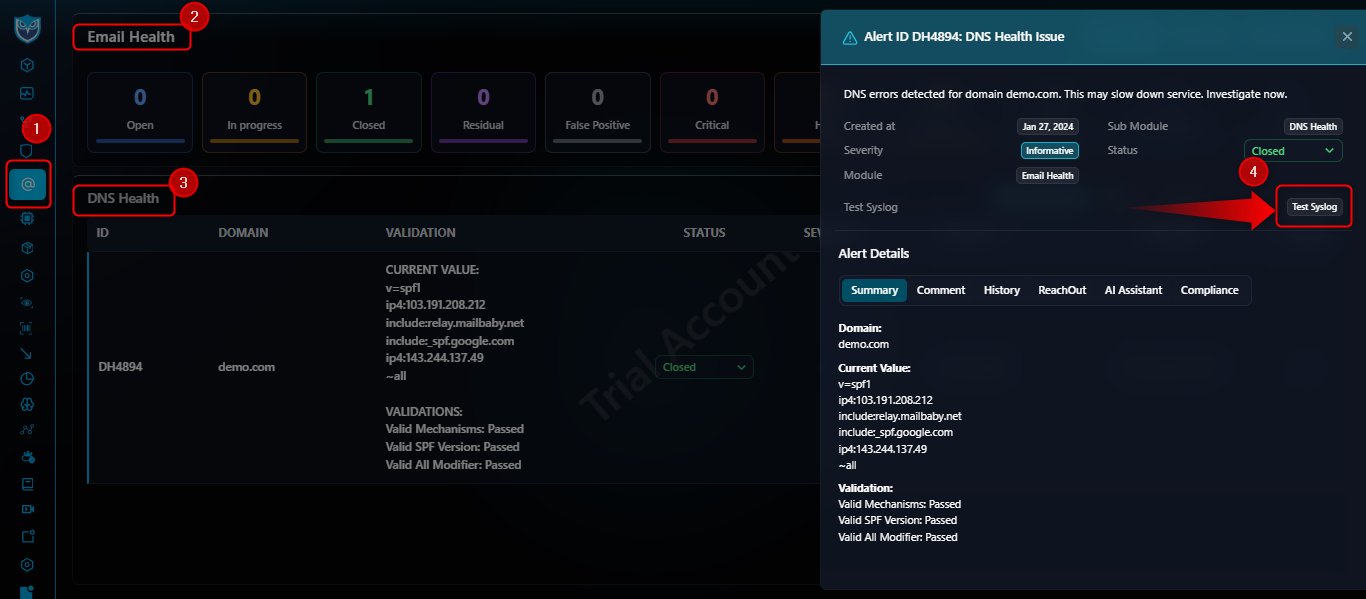
DNS Health
<13>May 28 05:35:51 custom-sender: identifier: techowl-shield || module: dns-health || id: 4894 || value: v=spf1 ip4:103.191.208.212 include:relay.mailbaby.net include:_spf.google.com ip4:143.244.137.49 ~all || validation_result: {"Valid Mechanisms":"Passed","Valid SPF Version":"Passed","Valid All Modifier":"Passed"} || _domain: demo.com ||
- value: SPF record string.
- validation_result: JSON of SPF checks.
- _domain: Domain under test.
From the left menu, navigate to Email Health and select
'DNS Health' > Click on Action button.
9
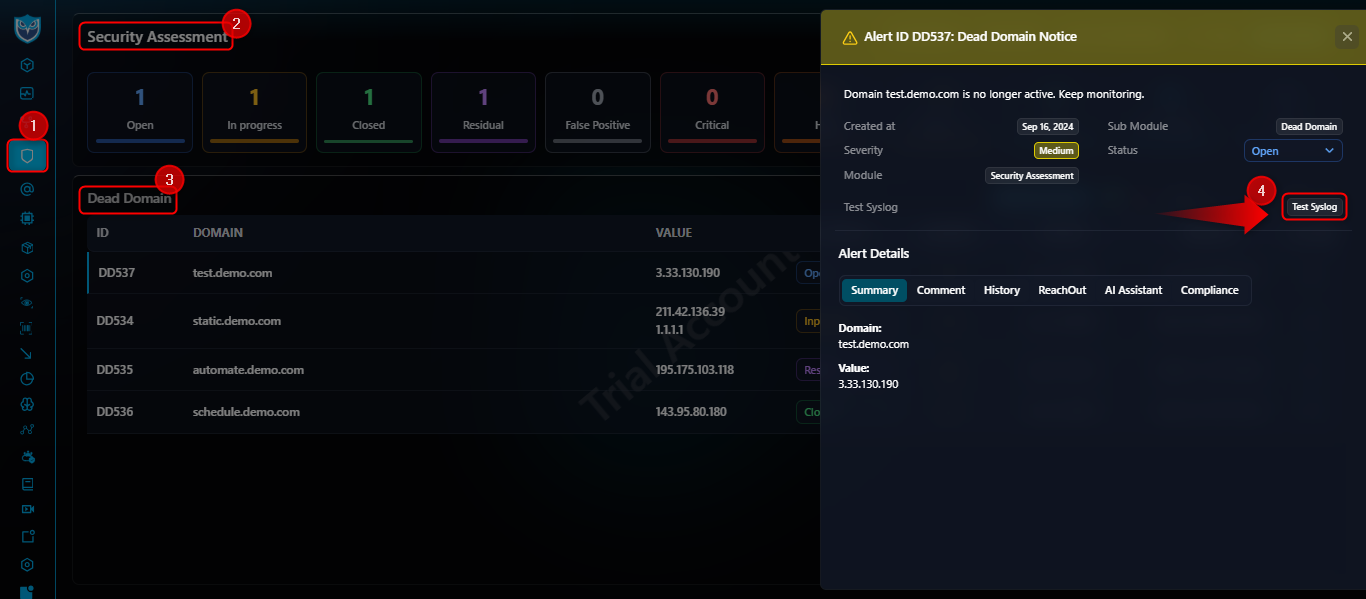
Dead Domain
<13>May 28 05:35:44 custom-sender: identifier: techowl-shield || module: dead-domain || id: 537 || _domain: test.demo.com || _ips: ["3.33.130.190"] ||
- _domain: Expired or decommissioned domain.
- _ips: Last-resolved IP addresses.
From the left menu, navigate to Security Assessment and select
'Dead Domain' > Click on Action button.
10
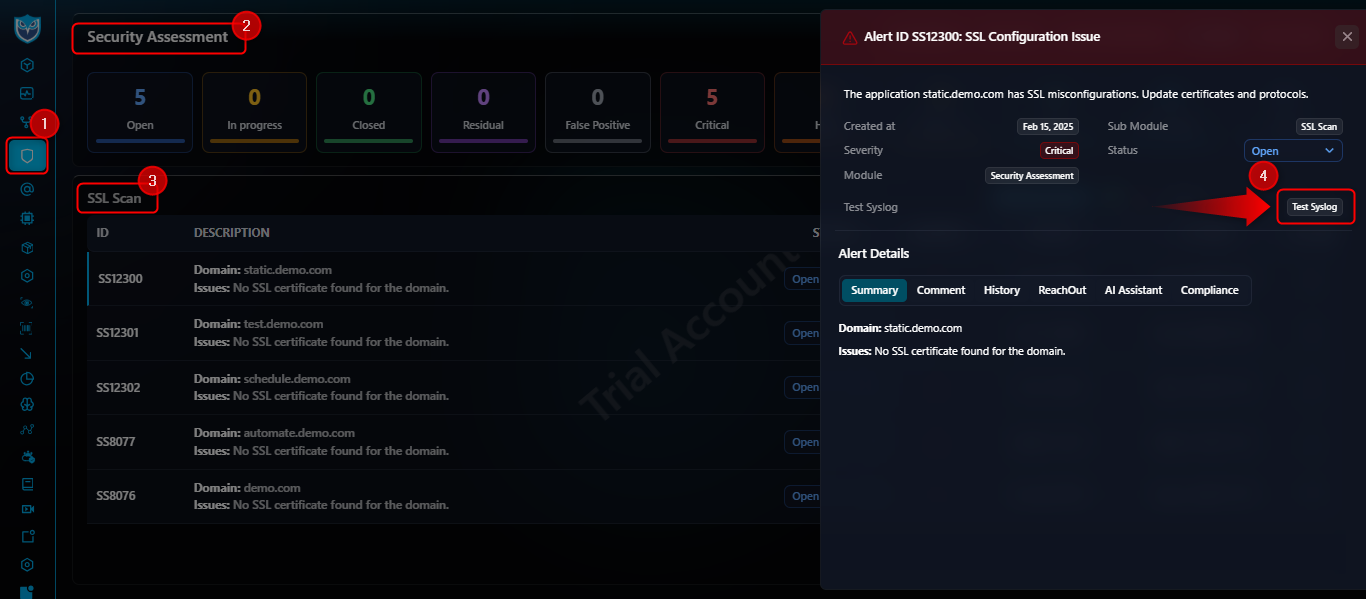
SSL Scan
<13>May 28 05:35:37 custom-sender: identifier: techowl-shield || module: ssl-scan || id: 12300 || is_ssl_available: 0 || _domain: static.demo.com ||
- is_ssl_available: Boolean (1/0) for SSL presence.
- _domain: Domain scanned.
From the left menu, navigate to Security Assessment and select
'SSL Scan' > Click on Action button.
11
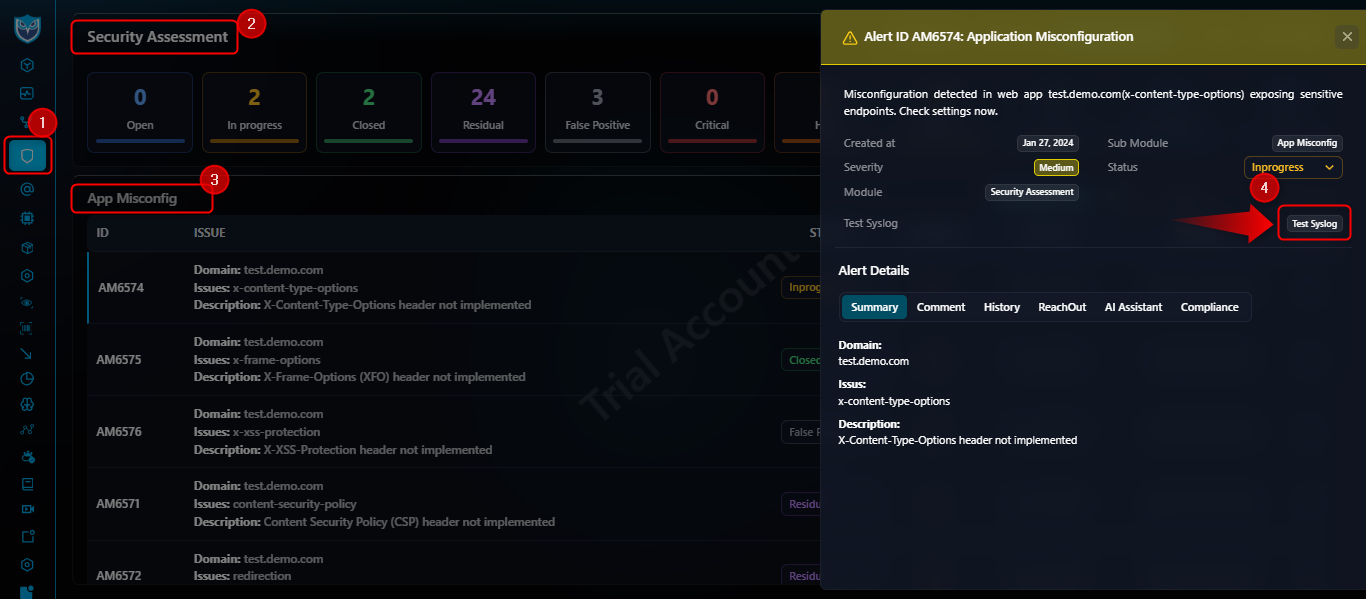
App Misconfiguration
<13>May 28 05:35:31 custom-sender: identifier: techowl-shield || module: app-misconfiguration || id: 6574 || score_description: X-Content-Type-Options header not implemented || _domain: test.demo.com ||
- score_description: Description of misconfiguration.
- _domain: Affected domain.
From the left menu, navigate to Security Assessment and select
'App Misconfiguration' > Click on Action button.
12
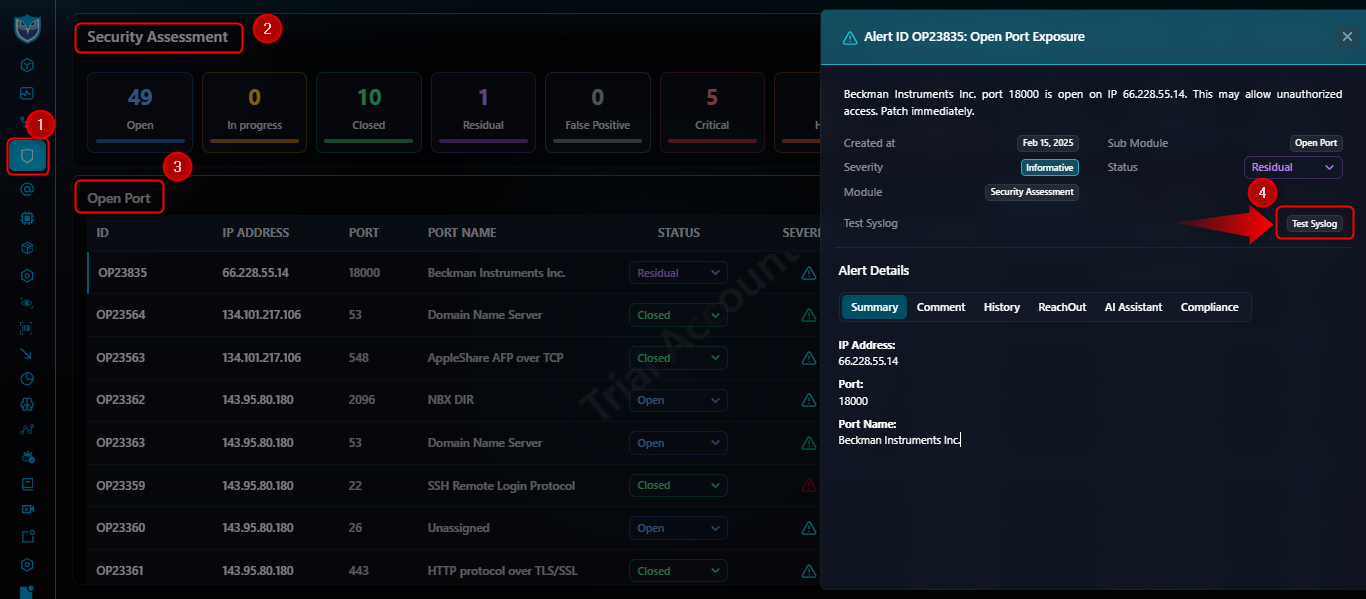
Open Port
<13>May 28 05:35:25 custom-sender: identifier: techowl-shield || module: open-port || id: 23835 || port: 18000 || _ip: 66.228.55.14 ||
- port: Exposed port number.
- _ip: IP address with open port.
From the left menu, navigate to Security Assessment and select
'Open Port' > Click on Action button.
13
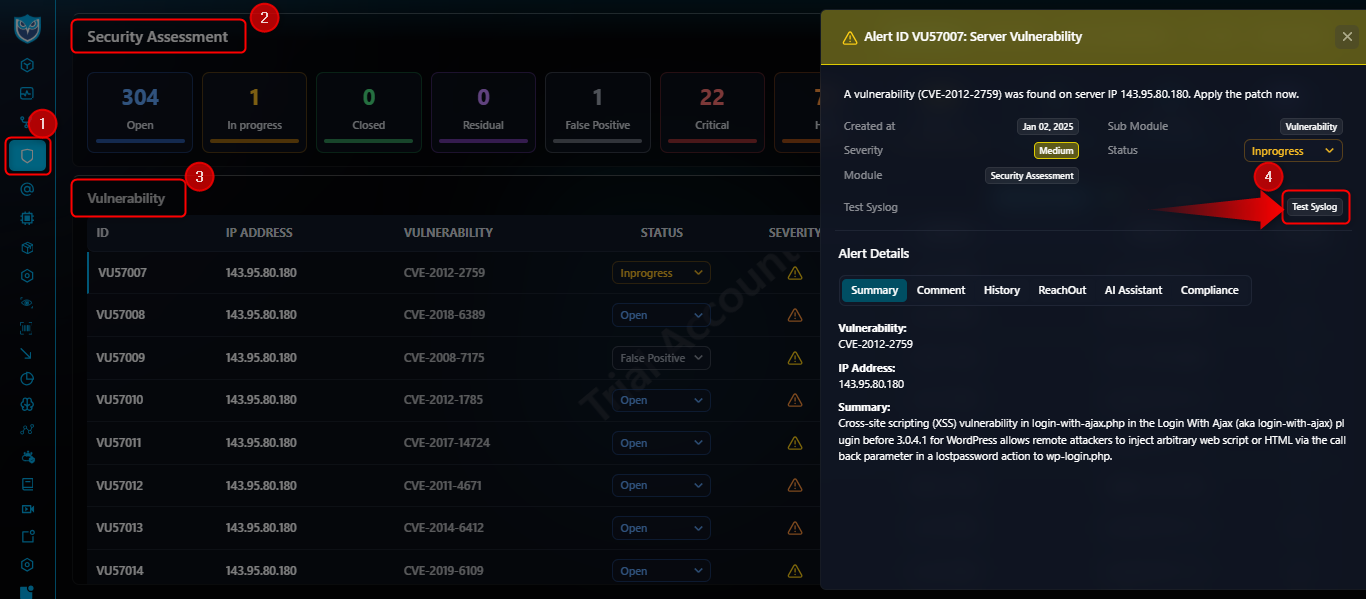
Vulnerability
<13>May 28 05:35:20 custom-sender: identifier: techowl-shield || module: vulnerability || id: 57007 || vulns: CVE-2012-2759 || summary: Cross-site scripting (XSS) vulnerability in login-with-ajax.php in the Login With Ajax (aka login-with-ajax) plugin before 3.0.4.1 for WordPress allows remote attackers to inject arbitrary web script or HTML via the callback parameter in a lostpassword action to wp-login.php. || _ip: 143.95.80.180 || current_status: Residual || current_severity: Medium ||
- vulns: CVE identifier.
- summary: Brief description of vulnerability.
- _ip: IP address of affected asset.
- current_status / current_severity: Status and severity.
From the left menu, navigate to Security Assessment and select
'Vulnerability' > Click on Action button.
14
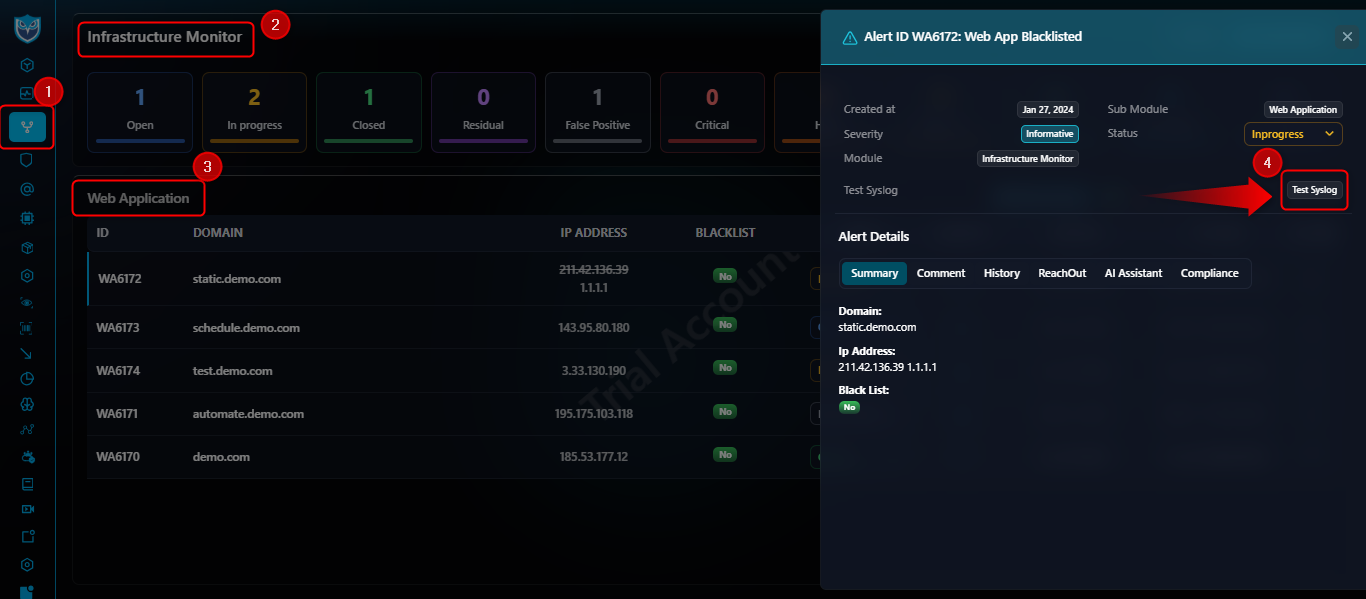
Web Application
<13>May 28 05:35:14 custom-sender: identifier: techowl-shield || module: web-application || id: 6173 || block_list: 0 || _domain: schedule.demo.com || _ips: [{"ip":"143.95.80.180","country_code":"US","org":"Newfold Digital, Inc.","city":"Jacksonville","location":"Florida,United States"}] || current_status: Open || current_severity: Informational ||
- block_list: Indicator if asset is blocklisted.
- _domain / _ips: Domain and associated IP details.
- current_status / current_severity: Status and severity.
From the left menu, navigate to Infrastructure Monitor and select
'Web Application' > Click on Action button.
15
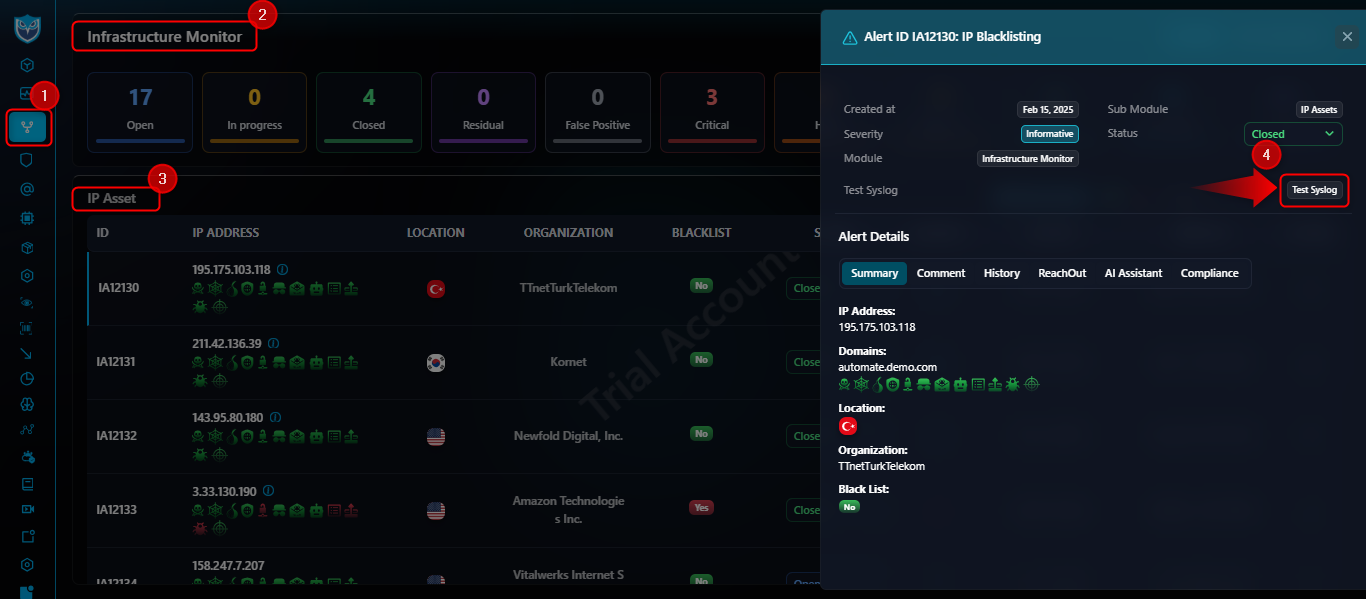
IP Asset
<13>May 28 05:35:05 custom-sender: identifier: techowl-shield || module: ip-asset || id: 12130 || ip_address: 195.175.103.118 || country_code: TR || org: TTnetTurkTelekom || city: Bilecik || location: Bilecik,Turkey || current_status: Inprogress || current_severity: Informational ||
- ip_address: Monitored IP.
- country_code / org / city / location: Geolocation and org details.
- current_status / current_severity: Status and severity.
From the left menu, navigate to Infrastructure Monitor and select
'IP Asset' > Click on Action button.
16
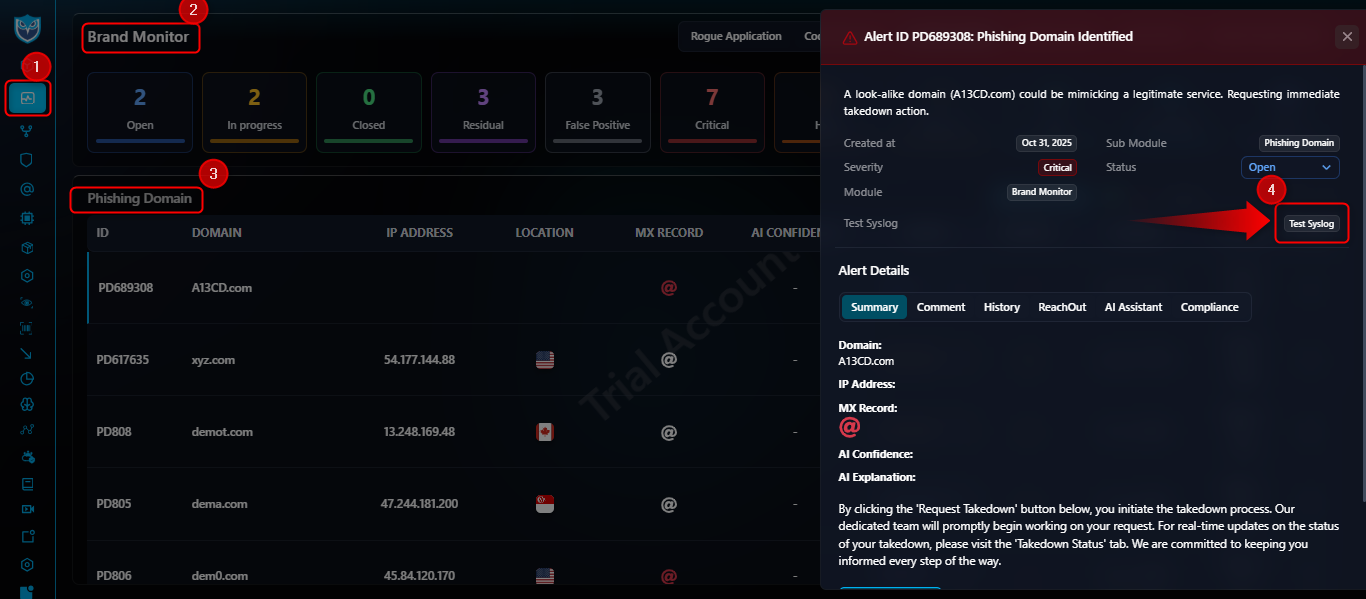
Phishing Domain
<13>May 28 05:34:39 custom-sender: identifier: techowl-shield || module: phishing-domain || id: 808 || domain_ascii: demot.com || ip_address: 13.248.169.48 || mx_record_exist: 0 || newly_monitored: 0 || country_code: CA || current_status: Inprogress || current_severity: High ||
- domain_ascii: ASCII representation of domain.
- ip_address: IP hosting the domain.
- mx_record_exist / newly_monitored: DNS flags.
- country_code / current_status / current_severity: Location, status, and severity.
From the left menu, navigate to Brand Monitor and select
'Phishing Domain' > Click on Action button.
17
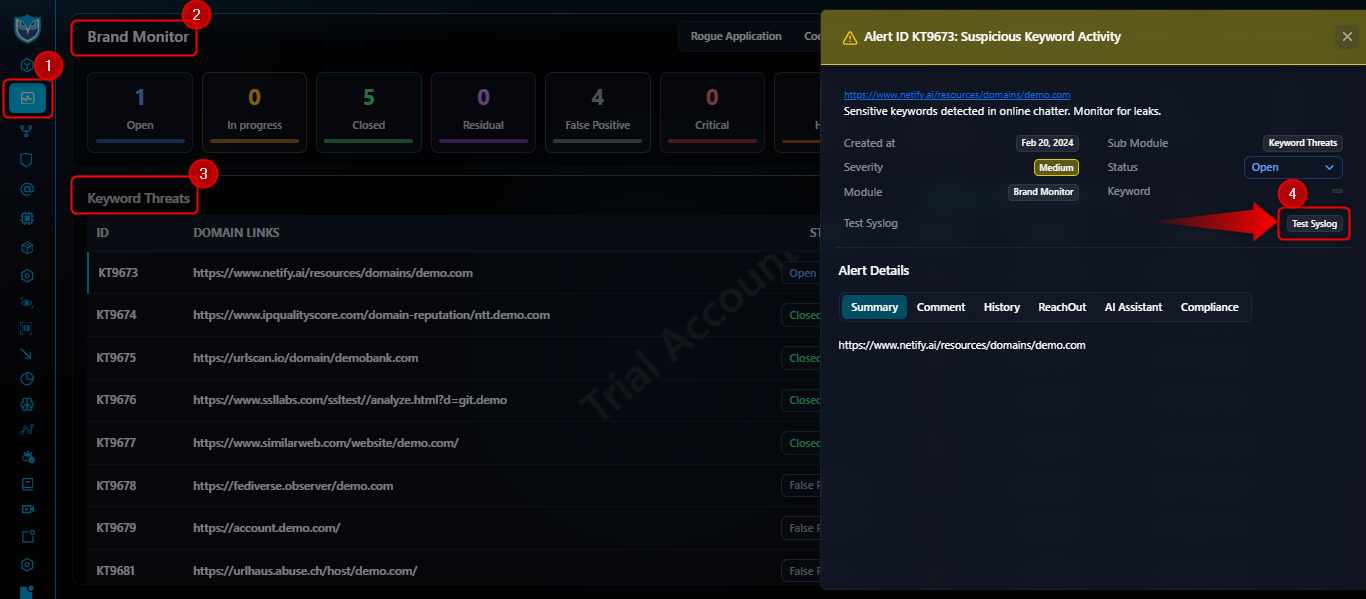
Keyword Threats
<13>May 28 14:55:22 custom-sender: identifier: techowl-shield || module: keyword-threats || id: 9673 || url: https://www.netify.ai/resources/domains/demo.com || current_status: Inprogress || current_severity: Medium ||
- url: Threat feed URL.
- current_status / current_severity: Status and severity.
From the left menu, navigate to Brand Monitor and select
'Keyword Threats' > Click on Action button.
18
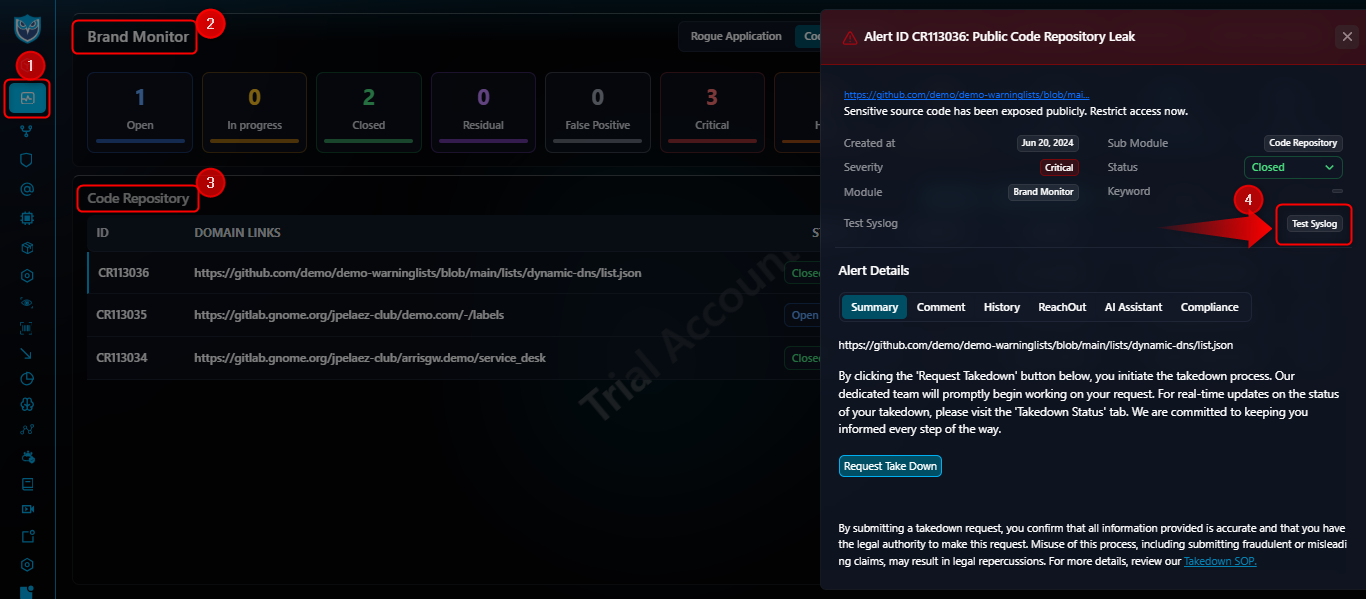
Code Repository
<13>May 28 14:55:02 custom-sender: identifier: techowl-shield || module: code-repository || id: 113036 || url: https://github.com/demo/demo-warninglists/blob/main/lists/dynamic-dns/list.json || current_status: Inprogress || current_severity: Critical ||
- url: Exposed repository link.
- current_status / current_severity: Status and severity.
From the left menu, navigate to Brand Monitor and select
'Code Repository' > Click on Action button.
19
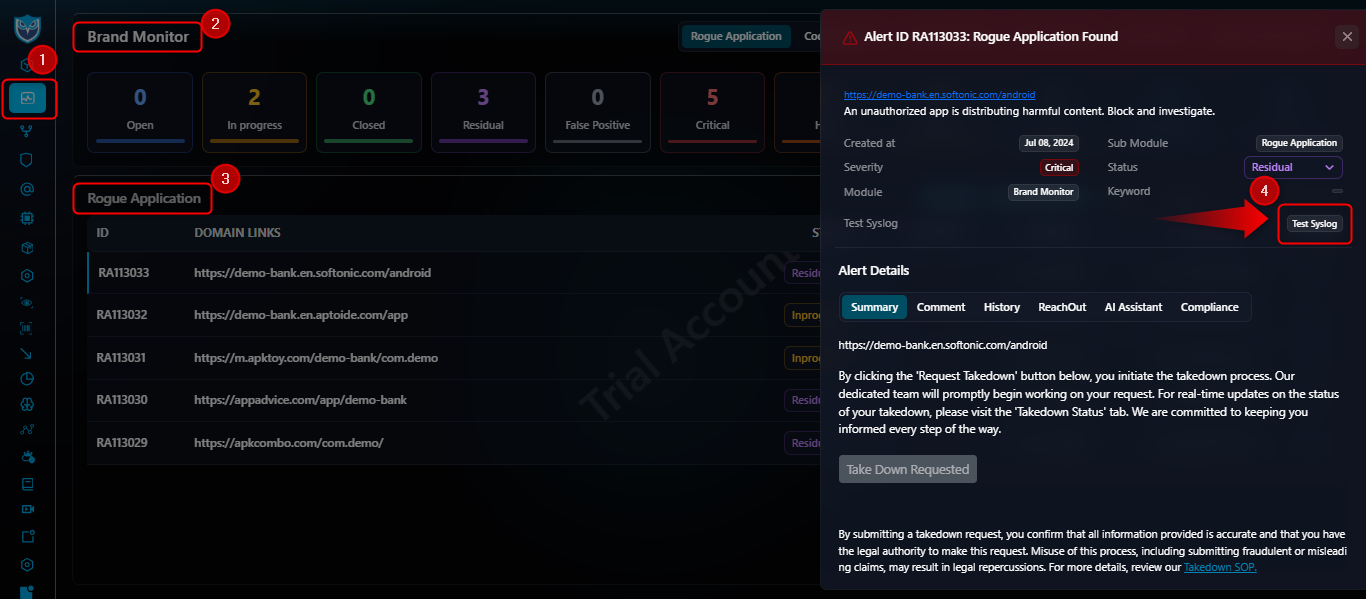
Rogue Application
<13>May 28 14:54:53 custom-sender: identifier: techowl-shield || module: rogue-application || id: 113032 || url: https://demo-bank.en.aptoide.com/app || current_status: Open || current_severity: Critical ||
- url: Location of unauthorized application.
- current_status / current_severity: Status and severity.
From the left menu, navigate to Brand Monitor and select
'Rogue Application' > Click on Action button.
20
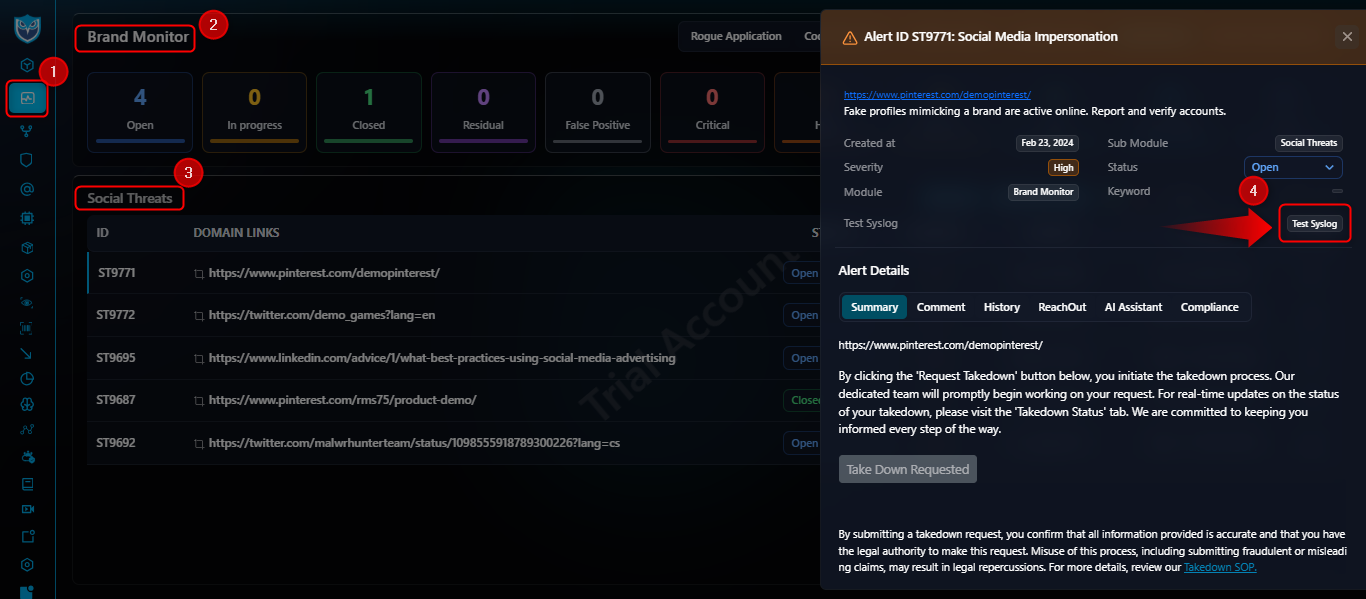
Social Threats
<13>May 28 15:10:54 custom-sender: identifier: techowl-shield || module: social-threats || id: 9771 || url: https://www.pinterest.com/demopinterest/ || current_status: Inprogress || current_severity: High || alert_created_at: 2023-09-04 17:20:30 || alert_updated_at: 2025-05-24 14:04:33 || alert_updated_by: abhishek abhishek ||
- url: Social media URL under monitoring.
- current_status / current_severity: Status and severity of threat.
- alert_created_at / alert_updated_at: Timestamps of first detection and last update.
- alert_updated_by: User who last updated the alert.
From the left menu, navigate to Brand Monitor and select
'Social Threats' > Click on Action button.
End of Documentation